What's new

Almost there

WayneKerr

Well-known member
Member
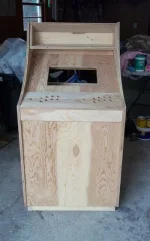
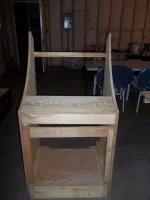
Finally, after about 10 years, I finally started the building the arcade cabinet. We'll finish it tomorrow, and I'll start staining the outside. The inside will be black. At the top of the cab, there will be a 5.5" marquee. No theme yet, but that'll come later.

The biggest impedance is the smoke glass to cover the monitor. I don't have any plex yet.
ibQty.webp

I am basing this based on this cab below.

http://forum.arcadecontrols.com/avatars/user/avatar_5179.png

 
Hey man that looks great! You are off to a great start! Can't wait to see this finished! B)
 
Nice job so far! What did you use to make the curves? I know of several ways, but what did you use? A jigsaw and sander are time consuming.
 
I'll have to post another pic after dinner. He had a full assortment of tools. We used a jig saw, but every time I used it, I looks like I was cutting with bacon... My brother in law cut the curves. Anyway, we had a router for the t-molding later, table saw, circular saw, miter saw, drill.

We were supposed to get two done this weekend, but we had to run to town to get some stuff, so it ate a bunch of time.

 
I have some parts to sand before I stain. I might also redo the bacon bezel. Its kinda thick, and it might look better with a beveled edge. The pitch of the montior bezel makes the monitor space look smaller. I have a 19 inch lcd that goes there. It has some warts yet, but its mine!

kmpcm.webp

This is what I started with:

http://img841.imageshack.us/img841/7527/1012457w.jpg

 
Oh man Waynekerr that looks great great work so far. You need a bigger screen though! :p
 
Ya. Unless you go super big, from what I read, the 4:3 monitors are better suited for this. I haven't seen many arcade games that use a wide screen, but its what I have.

I wanted to do a rotating setup, but that cabinet doesn't have enough depth for monitor to be turned both ways.

 
TODO

In no particular order

  • Wire control panel


  • Wire marquee


  • Install monitor


  • Configre hyperspin


  • Configure LED blinky


  • Design Marqee


  • Order and install t-moulding


  • Add speaker panel


  • Paint Base & Touch up paint


R06yf.webp

GbPbj.webp

3106[/ATTACH]"]F4RoG.webp

F4RoG.webp

 
Back
Top