What's new

AdGuard Home

nodle

Administrator
Staff member
Member
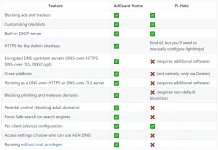
Ran across some people talking about this and comparing it to Pi-hole. They offer quite a range of installation methods. But this one is for running on a Rasberry Pi, similar to Pi-hole. Might give it a try to test it out.

https://adguard.com/en/adguard-home/overview.html

Installation guide:

https://github.com/AdguardTeam/AdGuardHome#getting-started

68747470733a2f2f63646e2e616467756172642e636f6d2f7075626c69632f416467756172642f436f6d6d6f6e2f616467756172645f686f6d652e676966


LLni6KK.webp

 
Last edited by a moderator:
So I took this on as a little project tonight. It was fairly easy to setup, more than I thought it would be and was way easier than setting up Pi-hole. I am really enjoying it. I will run for awhile and report back what I think. But at this time I think it will replace my Pi-hole. Also supports DoH out of the box, which in Pi-hole you have to setup separately. Also has great parental controls.
 
Really enjoy this program. Installed their mobile version on my phone as well, and went ahead and purchased a family lifetime license. If you are going to check out StackSocial they have great deals on their lifetime licenses.
 
So I am running this full time, and am no longer running my Pi-hole. Does about the same and actually brings more to the table in an easier to install/upgrade/configure package. It's also great for you that have kids at home.
 
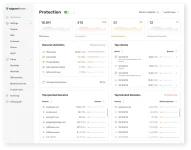
I have been monitoring this since I have installed it and I am averaging about 30%-35% blocking daily. That just shows you how much nasty stuff is out there clogging your network up. Most of this is from IoT devices and streaming services. This is even easy to setup than Pi-hole so there is no excuse not to run this on your home network.
 
Did a clean install and upgraded the Raspberry Pi OS to 'Bullseye' from 'Buster'. Some help full tips:

When installing the OS to a micro-SD card make sure to select Shift+Ctrl+X and go ahead and set your SSH password here. This way you can just plug it into your network, find it's IP and SSH into it to finish the setup. This way you have a headless install and don't require a monitor or keyboard. Make sure you just download the 'Lite' version as well. After installing make sure to remove your DNS so that your traffic can get out to install AdGuard, and afterwards you can switch it back to your new IP.

https://www.raspberrypi.com/software/

 
Last edited by a moderator:
So I thought I was going to go back to NextDNS, but actually went back to AdGuard Home. Last time I ran it off a Raspberry Pi, but this time I installed it on my Synology NAS in a Docker image. Setup is fairly easy, you can use Ai to walk you through a setup, just have to create a few folders and map them. A few things to note if anyone does decide to try it out. On your upstream server, run multiple and pick the fastest ones that are near you by using a tool like:


Then I used the DoH version and make sure to select Parallel Queries, AdGuard Home will query all upstreams simultaneously and use whichever returns a valid response the fastest, you basically make them compete for whoever is the fastest. Also enable optimistic caching as well for even faster performance. Best of all it’s all free!
 
Current block lists:

  • AdGuard DNS filter
  • AdAway Default Blocklist
  • OISD Blocklist Big
  • HaGeZi's Pro Blocklist
  • HaGeZi's Threat Intelligence Feed
 
Well, I installed this on my Raspberry Pi 4 and got it hooked up to my network last night. It went so easily that I thought maybe I did something wrong.
 
Make sure to add:

Code:
sudo apt update
sudo apt install unattended-upgrades
sudo dpkg-reconfigure unattended-upgrades

This will auto-download and patch security updates.

Verify it's running:
Code:
systemctl status unattended-upgrades

Make sure that they are scheduled:

Code:
cat /etc/apt/apt.conf.d/20auto-upgrades

You should see:

Code:
APT::Periodic::Update-Package-Lists "1";
APT::Periodic::Unattended-Upgrade "1";

Meaning: Update package lists daily. Install approved updates automatically.

and then every once and awhile ssh in and run:

Code:
sudo apt update && sudo apt full-upgrade -y && sudo apt autoremove -y && sudo apt autoclean
 
Last edited:
Ai made it easier...

✅ Check for updates daily
✅ Install security updates automatically
✅ Clean old downloaded packages every 7 days
✅ Remove unused dependencies every 7 days

Copy and paste:

Code:
sudo apt update

sudo apt install -y unattended-upgrades apt-listchanges

sudo dpkg-reconfigure -f noninteractive unattended-upgrades

sudo tee /etc/apt/apt.conf.d/20auto-upgrades > /dev/null <<EOF
APT::Periodic::Update-Package-Lists "1";
APT::Periodic::Unattended-Upgrade "1";
APT::Periodic::AutocleanInterval "7";
APT::Periodic::AutoremoveInterval "7";
EOF

sudo systemctl enable --now unattended-upgrades

Verify it's enabled

Run:

Code:
cat /etc/apt/apt.conf.d/20auto-upgrades
You should see:
Code:
APT::Periodic::Update-Package-Lists "1";
APT::Periodic::Unattended-Upgrade "1";
APT::Periodic::AutocleanInterval "7";
APT::Periodic::AutoremoveInterval "7";

Check the service:
Code:
systemctl status unattended-upgrades
You want to see:
Code:
Active: active (running)
 
For upstream servers for AdGuard Home (DoH with Malware blocking and threat intelligent feeds)

Code:
https://dns.quad9.net/dns-query
https://security.cloudflare-dns.com/dns-query

Then bootstrap servers (IPv6-friendly)
Code:
9.9.9.9
149.112.112.112
2620:fe::fe
2620:fe::9
1.1.1.1
1.0.0.1
2606:4700:4700::1111
2606:4700:4700::1001
 
On Raspberry Pi, you can check for and install updates from the terminal.

Refresh the package list:
Code:
sudo apt update
Install all available package updates:
Code:
sudo apt upgrade
If you also want to install updates that require adding or removing packages (such as kernel or firmware changes):
Code:
sudo apt full-upgrade
Remove packages that are no longer needed:
Code:
sudo apt autoremove
Reboot if the kernel, firmware, or other core components were updated:
Code:
sudo reboot
 
What’s crazy is after running this for about a week solid roughly 30% of my DNS requests are just tracking/ads just trying to call back home. I mean that’s just nasty. TVs are probably one of the largest.
 
Well, I removed Adguard. When you have your client named and the IP changes, you will have to rename it. You can hard-encode it by MAC address, but for this to work properly, you will need to use the built-in DHCP server.
 
Back
Top